Prepare the runtime and game folder
Open the Bookworm player and use its runtime download link to obtain the Wine 6 ZIP. The player links to the runtime but does not bundle or import it automatically.
Prepare your complete extracted game folder or a ZIP of that folder. Include BookwormAdventures.exe, main.pak and all supporting files. The verified game edition is the unchanged 2007 PopCap trial.
The original release and the tested trial build are different dates. The trial’s limits and saved state remain in effect; this setup does not convert it into a full retail copy.
Complete the two imports
Follow the two numbered sections on the setup screen. A lone main.pak file is enough for the separate resource inspector, but it is not enough to run the original game.
- In Browser runtime, choose the downloaded Wine 6 runtime ZIP.
- Wait for the runtime status to confirm the import.
- In Your game, choose the extracted game folder or its ZIP.
- Read the game status, then press Play original game when it becomes available.
Use the letter grid and action buttons
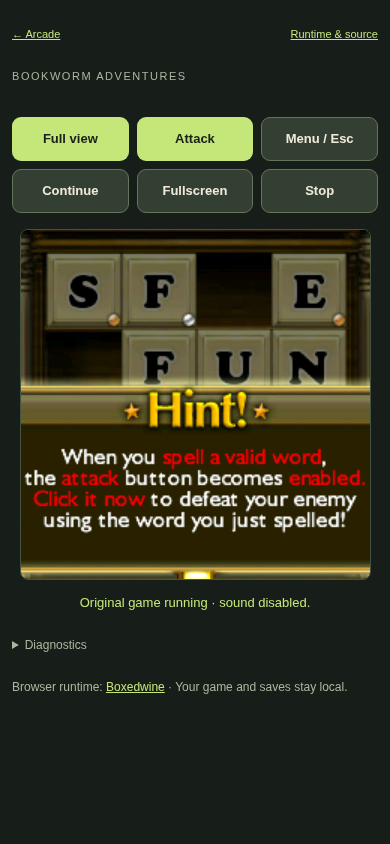
Click or tap the original letter tiles to build a word, then use Attack. The tested opening tutorial asks for PLAY. Use Continue to advance story dialogs. For the original New User dialog, click its on-screen OK button; Continue is not a universal confirmation action.
Zoom tiles enlarges the letter grid up to 1.5×, adapting to the available screen space for touch selection. It does not change the original game’s rules. Menu / Esc opens the original menu; Fullscreen expands the view and Stop returns to setup.
The player preserves the original 800 × 600 game screen and scales it into the page. Mobile layout support does not establish smooth performance on every physical phone.
Sound starts after Play
Original sound starts enabled when you press Play. Use Sound on/off to mute and restore it. The player remembers your mute choice on this device.
If the opening is quiet, check the Sound button, your browser’s audio setting and your device volume after interacting with the player. Do not assume a loading pause means the game is permanently silent.
Allow time for the first launch
The first launch can take several minutes while the browser runtime and original game start. The running status does not mean the original menu is ready. Wait for the trial’s own Play button. If the original game asks about checking for updates, choose No to continue offline. This player uses substantial memory; a successful page load does not guarantee a complete game session on a low-memory device.
If Play is unavailable, read the runtime and game status separately. Confirm that the runtime ZIP was imported and the game folder includes its executable, main.pak and supporting files. Complete retail compatibility and full-campaign behavior are unverified.
Common import errors and recovery
A rejected runtime needs the exact Wine 6 ZIP from the player link, downloaded completely. The player checks its size and checksum; other Wine archives are not interchangeable.
For missing executable errors, select the complete extracted game folder. A ZIP must be under 512 MB and contain safe relative paths. Avoid installer archives and unrelated folders.
If the runtime stops or reports a memory error, use Stop when available and reopen the player. Close other game tabs before another attempt. Diagnostics records the error; repeated failures may require a device with more available memory.
To save an adventure, open the original Menu, choose Quit To Main Menu and confirm Yes. Then use Stop to flush the local Wine prefix. Reopen in the same browser, press Play and choose Adventure to resume. A saved first-chapter battle was restored after closing and reopening the browser; full-campaign saves remain unverified. If Stop reports a storage failure, keep the tab open, free local site storage and retry. Remove saved files deletes imports and the local prefix, including trial state and saves stored there. Keep the runtime and game folder separately, and use removal only when you intend to reset.
What stays on this device
The runtime, imported game files and Wine prefix are stored locally. That prefix includes the original trial state. Imported files are not uploaded by the player.
Remove saved files or clearing browser site data can remove your imports and local data. Keep copies of the runtime ZIP and original game folder outside the browser. Using a different browser or device means a separate setup.
Testing evidence and sources
Retained Chromium checks cover the original tutorial word PLAY, attacking, enemy defeat, Cassandra dialogue, original audio and a first-chapter battle restored after closing and reopening the browser. Bottom controls, imports and sound settings were checked in Chromium, Firefox and Linux WebKit.
Retail compatibility, whole-campaign behavior and saves beyond the checked first-chapter battle remain unverified. Touch layouts are emulated; physical phones and actual Safari have not been validated.
Recorded test scope and limitations ↗
Sources and what they support
- Boxedwine emulator source
Upstream emulator. Our build is pinned to d7d5a1421bd781a81cbdf8f222cced11a7ebd76e; the emulator license does not grant game rights.
This page was reviewed against retained validation records. Review dates do not mean every game test was rerun that day. Screenshots show individual recorded scenes; they do not establish full campaign, device or native-game parity.
Take it into the game